QMK keyboard tricks
Sep 9, 2026 - ⧖ 4.0 minI have a lot of mechanical keyboards. My current and most commonly used one is a Boardsource Equals 60, a beautiful aluminium keyboard with a 5x12 grid layout. It's like a large, metal chocolate bar.
While I won't go into the exact details of my layout in this post, I will explain some of the tricks I use to make my typing experience as nice as possible
Use Vial
Vial lets you reprogram your keyboard in your Web browser. It's really useful.
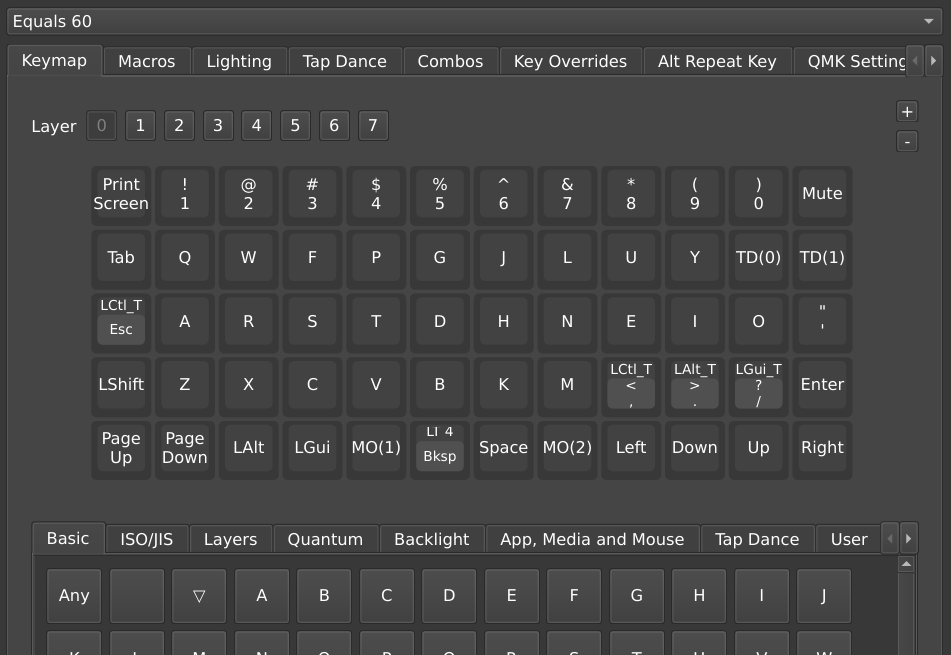
Colemak built into the keyboard
QWERTY is the standard keyboard layout used on most keyboards. There are alternative layouts, such as Dvorak and Colemak, but you'll notice that using these makes gaming harder. When your OS reinterprets the keys, you have to reconfigure every game you play to put the keys where you expect. WASD is a lot less ergonomic on other layouts.
If your keyboard handles the layout conversion, you can have your computer use an alternative layout like Colemak (my personal choice) without having to rebind video games.
Easy Page Up / Page Down
On a normal keyboard, Page up and Page down are near the top right of the board. I put it on the bottom left instead. That way I can scroll up and down documents with one hand, without straining. It's simple but helpful.
Backspace thumb key (and nav layer)
My keyboard has two keys on the bottom centre. I bind the one on the right to Space, since I always press that with my left thumb. The right key is bound to Backspace. Now if I make a mistake I can undo it without stretching my right hand above the Enter key.
I take this a little further and make it so that holding the Backspace button switches my keyboard to a new layer. This puts the arrow keys under my right hand, so I can easily move the cursor while typing without leaving the homerow. Instead of moving my hand to the arrows, I move the arrows to my hand.
Escape/Control dual action button
On a normal keyboard, the key to the left of the A key is Caps Lock. Not a very useful key for such a great position on the keyboard. QMK lets you bind this to Escape, a much more useful key. You can go even further and making it so tapping the key sends an Escape, and holding it holds down Control. This makes keyboard shortcuts like ctrl + a and ctrl + c much easier.
Planck Tri-Layer (lower, raise, adjust)
The OLKB Planck is the first reprogrammable keyboard I found. This introduction video is what hooked me into the world of mechanical keebs:
My first introduction to QMK keyboards
The OLKB Planck uses two extra function keys, Lower and Raise. These go to the sides of Space and Backspace, so they're really easy to access. Hold Raise to "pull down" the number keys and get access to symbols. Hold Lower to "pull down and shift" the number keys to get easy access to !, # and all the other top row symbols. Hold both for an "adjust" layer, where I keep my function keys, Print Screen and Caps Lock.
The Tri-Layer setup is all you really need to fit a full keyboard's worth of keys on a normal keyboard. One of my other keyboards is the Ferris Sweep, and the Tri-Layer setup lets me comfortably type with 34 keys.
Combo keys
OLKB was a very influential mechanical keyboard company, and another was GBoards. They pioneered using keyboards with very few keys, and "chording" key presses to fit extra actions on the keyboard. With combos I can press the space between H and J (slide your right index finger slightly left into the gap between these keys) and I get Enter. I can do the same on the other side of the keyboard for Escape. It's like having extra buttons between your buttons.
GBoards also gave us the best Choc switch, the GChoc (or Choc Pink as they're branded now). If you ever decide to build a low profile keyboard, try using them.
Easy Colon
QMK has a feature called Tap Dance. This lets you change what a key does by double tapping it, or by holding it. I have it set up so that tapping ; works as normal, but holding it types out a : instead. I use Vim and Helix a lot, and the colon key is very important for typing commands.